
Compare two Zoho CRM orgs side by side
See every field, layout, workflow and function that differs between two orgs.
The problem
Sandboxes drift. Someone adds a picklist value directly in production to unblock a sales rep. A consultant tests a workflow in the sandbox and never promotes it. Six months later the two orgs look alike on the surface and behave differently underneath, and nobody can say exactly where.
You need the answer before you build on top of the sandbox, before a release goes out, and when you take over an org someone else set up. The question is always the same: what is in one org and not the other, and what exists in both but is configured differently.
How it's done today
Usually by eye. Open Setup in both orgs, walk through modules, fields and layouts, and note what differs in a spreadsheet. It takes hours on a mature org, it misses the details that hide inside a field's properties or a workflow's criteria, and it is out of date the moment someone changes something.
Zoho's sandbox tools help from a different angle. A sandbox keeps a Change Set of the edits made in it, which you can group and filter by component, action, user and date, and the deploy step checks for conflicts. Zoho's documentation describes that list and the conflict check; it doesn't describe a value-by-value comparison of the two orgs. Rebuilding a sandbox copies the latest production settings, which resets the drift rather than showing it to you.
Run a diff in Zeploy
Connect both orgs under the same organization on the Connections page. Each connection carries a PRODUCTION or SANDBOX badge that Zeploy reads from Zoho, and you can give each one a nickname, since a sandbox and its production org often report the same name.
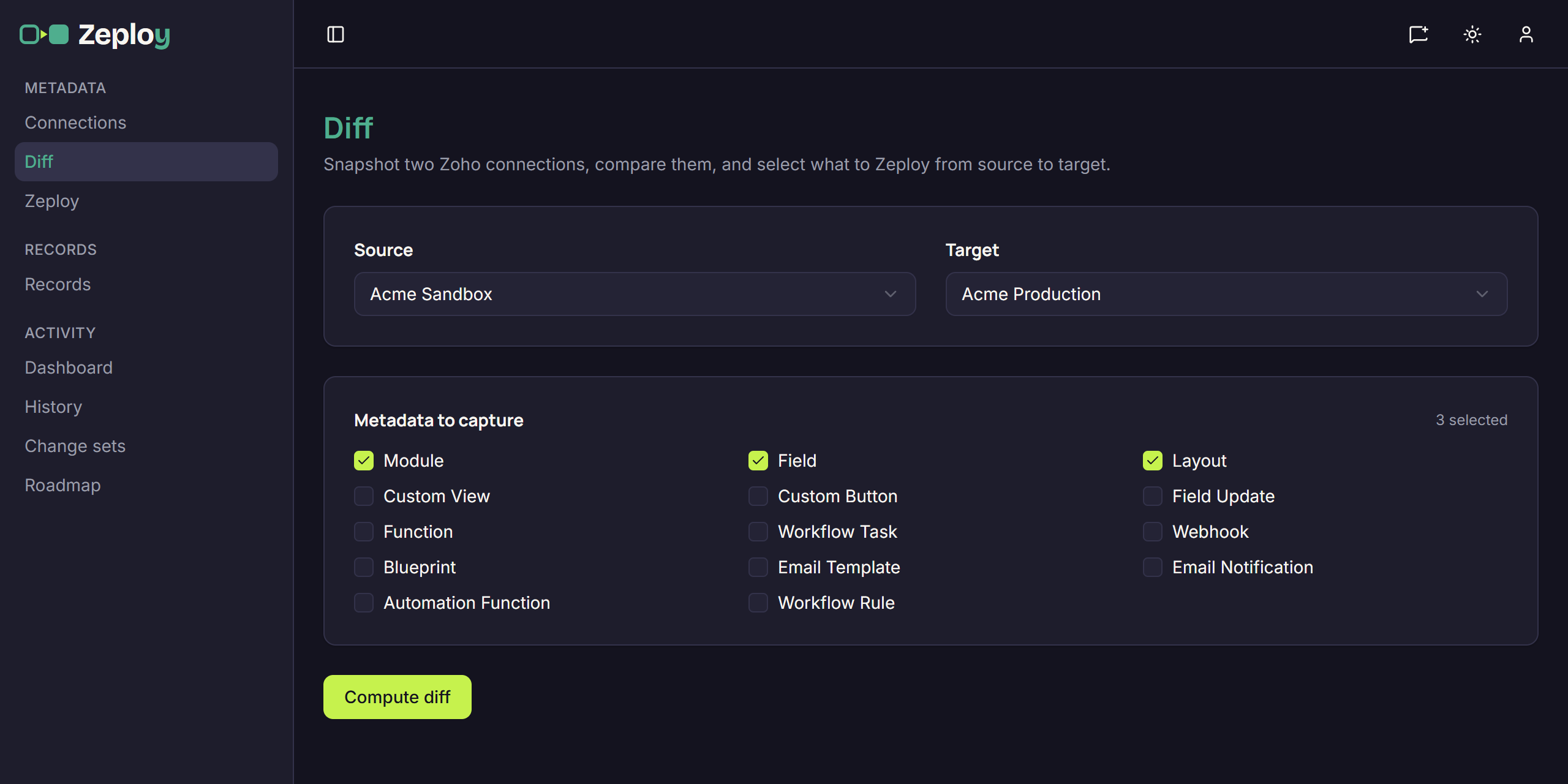
On the Diff page, choose a Source and a Target. Then tick the Metadata to capture. The types are Module, Field, Layout, Custom View, Custom Button, Field Update, Function, Workflow Task, Webhook, Blueprint, Email Template, Email Notification, Automation Function and Workflow Rule. Nothing is ticked at first, and fewer types means a faster diff, so pick the ones the question is about.
Choose Compute diff. Zeploy takes a fresh snapshot of both orgs at the same time, so you always compare their current state, and each side shows its progress and a component count. A diff only reads; nothing is written to either org.
Read the results
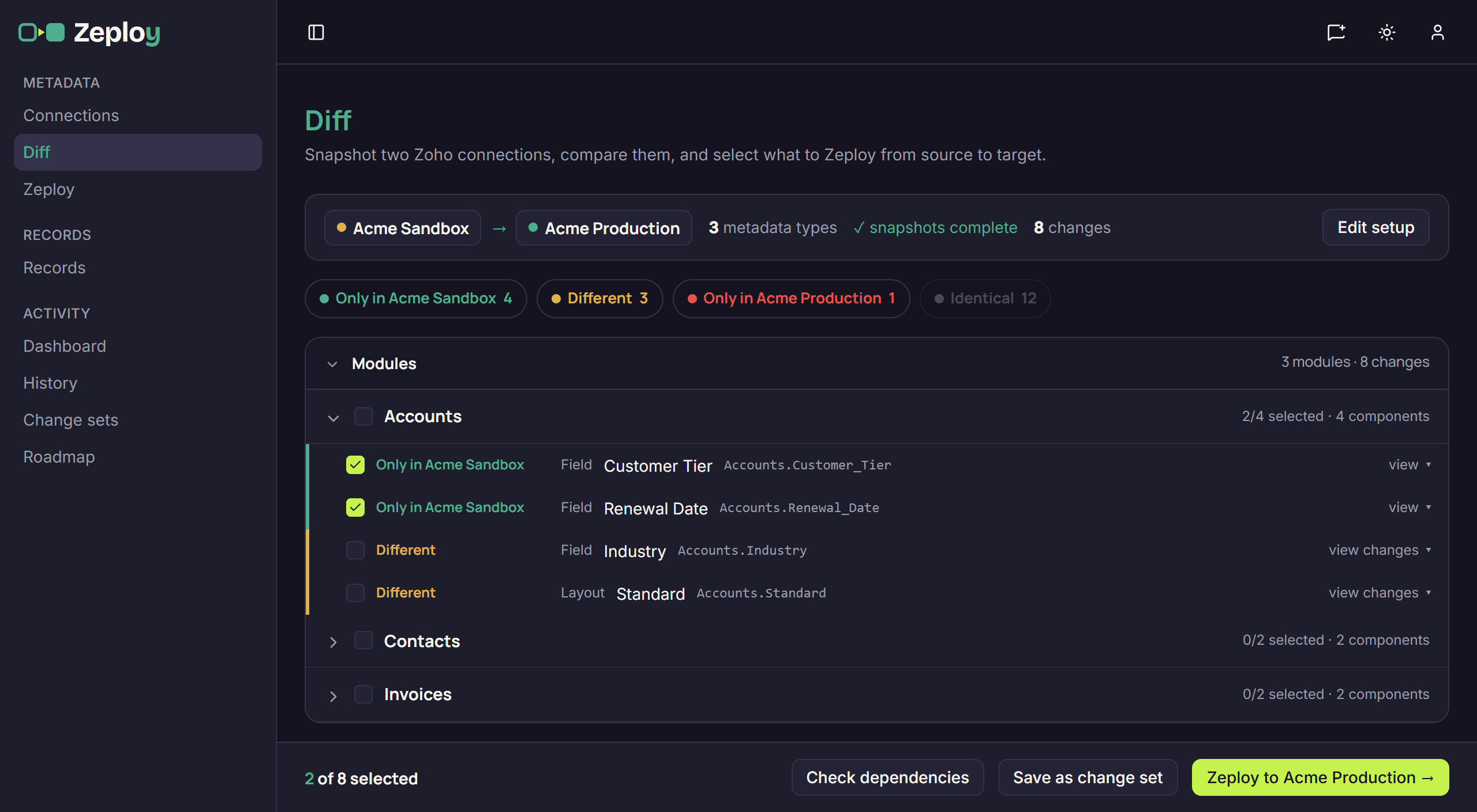
The setup folds into one summary line: source, target, the number of metadata types, snapshots complete and the number of changes. Four pills filter the results and show their counts: Only in the source, Different, Only in the target, and Identical, which is hidden until you turn it on.
Results are grouped by module, with separate sections for org-wide types such as functions and webhooks. Each row shows its status, its type and the component's name and API name. Choose view changes on a Different row to see the field-by-field comparison, or view on an item that exists on one side only.
From here you can stop, having learned what you needed, or tick rows and carry on to deploy them. Check dependencies lists anything your selection needs that is missing, and Save as change set keeps the selection for later.
Three ways people use it
Drift check. Run a diff between sandbox and production on a regular schedule of your own, with the types your team edits most. Anything under Only in the target or Different that nobody remembers is a change made straight in production.
Pre-release review. Before you deploy, compare the sandbox with production and read every Different row with view changes. It works like a code review for Zoho configuration: you see what the release would change, not what someone thinks they changed.
Auditing a client org. When you take over an org, connect its sandbox and production and diff them across all types. The counts tell you how far apart they are, and the module groups show where the work has been done.
What to watch for
A diff only pairs connections in the same organization, and each organization holds up to three. A connection left under Ungrouped isn't offered until you assign it. A small N not captured note under a side means some components couldn't be read from Zoho and are missing from that diff. Large orgs take longer, and Zeploy waits up to five minutes for each snapshot.
Items only in the target are listed for information. Zeploy never deletes a component, so they can't be selected. Metadata diffs aren't saved as their own entries; the Snapshots tab in History lists the org reads behind them.
Questions
- Does comparing two orgs change anything?
- No. Computing a diff reads both orgs and writes nothing. Changes only happen if you select rows and choose Zeploy on the review screen.
- Can I compare production against a sandbox, not just the other way round?
- Yes. Either side can be sandbox or production. Pick the Source first, because the Target list only offers other connections in the same organization.
- Does it show the actual differences inside a field or layout?
- Yes. A Different row has view changes, which opens the field-by-field comparison of that component in both orgs.
- Can I compare records as well as setup?
- Yes, on the Records page. You pick one module and the fields that identify a record, and Zeploy groups rows into Insert, Upsert, Needs attention and Identical.