
Zeploy vs Zoho CRM's built-in sandbox deploy
A comparison of Zeploy and Zoho CRM's built-in sandbox deployment, including when Zoho's tool is enough.
Two tools for the same job
If your Zoho CRM edition includes sandboxes, you already have a way to move changes to production. So the fair question isn't whether you need another tool to deploy at all. It's whether the way Zoho's deploy works fits how you build and release, and where it leaves gaps you fill by hand.
This page sets out what Zoho's sandbox deploy does, taken from Zoho's own help articles, and where Zeploy works differently. Where Zoho's documentation doesn't describe something, we say so, rather than claim Zoho can't do it.
What Zoho's sandbox deploy does well
It is part of Zoho CRM. Zoho's table lists 3 Configuration and 2 Configuration-and-Data sandboxes on Enterprise, and 7 Configuration, 3 Configuration-and-Data and 1 Full-data sandbox on Ultimate. A new sandbox can import all production configurations or only selected ones, and a sandbox can be rebuilt to copy the latest production settings.
Changes made in a sandbox are collected in a Change Set, grouped by component, record type, action, user and date, and filterable. You deploy the complete change set or only the items you select. The Start Deployment page checks dependencies and labels each item Qualified or Conflicted, for example for a missing parent item, an overriding name or an exceeded feature limit, and conflicted items aren't pushed until you fix them. A Zoho community post describes a resolve step that selects missing dependent items for you and lets you rename duplicates.
The coverage is broad. Zoho lists Profiles, Roles, Data Sharing Settings, Groups, Multi-currency, Territory Management, Workflow Rules, Blueprint, Templates, Webforms, Translations, Wizards and Tags among the supported components. Functions, Client Scripts, Web Tabs, Custom Links and Custom Buttons are deployable, and in sandboxes that hold production data Zoho replaces IDs and URLs for production. Deployment Logs list six months of deployments with the date, sandbox, items and user.
Where Zeploy works differently
Direction. Zoho's documentation describes deployment from a sandbox to its own production org. Zoho's documentation describes production settings reaching a sandbox when you create or rebuild it; it doesn't describe deploying selected changes from production into an existing sandbox, or deploying to another sandbox or a different org. In Zeploy either side of a diff can be sandbox or production, so you can bring one production setting back into a sandbox without a rebuild, or move a change from one sandbox to another. Both connections sit in the same Zeploy organization.
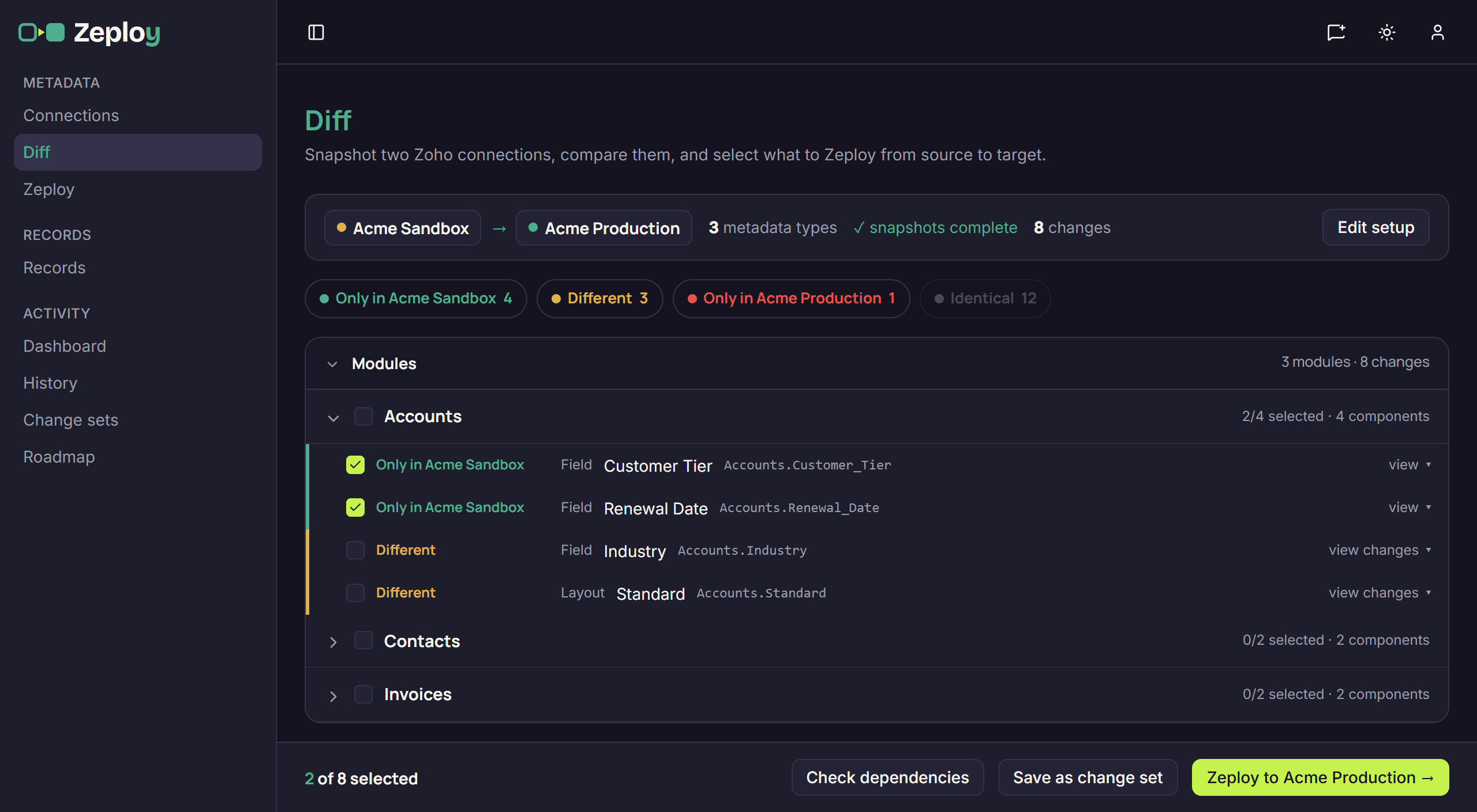
Seeing the difference. Zoho's documentation describes a change-set list and a conflict check; it doesn't describe a value-by-value comparison of the two orgs. Zeploy snapshots both orgs and lists what is only in the source, what is different and what is only in the target, and view changes opens a field-by-field comparison. Because it compares current state rather than a list of edits, it also shows changes someone made directly in production.
Records. Zoho says records added, imported or populated in a sandbox can't be deployed to production. Zeploy's Records page compares one module between two connections, matches rows on fields you choose, and inserts or updates the rows you tick, with lookups re-pointed to the target's records.
Approvals. Zoho's documentation doesn't describe an approval step before a deployment; the Manage Sandbox permission decides who can deploy. In Zeploy a member without Can Zeploy uses Send for Zeployment, and an owner or admin reviews the request, can untick items, and Zeploys or rejects it.
Sandbox not required. Zoho's deploy starts from a sandbox, and Zoho's sandbox table covers Enterprise and Ultimate and their trials. Zeploy's Diff pairs any two connections in an organization and doesn't require either connection to be a sandbox, so it can compare two production orgs.
Side by side
Cost. Zoho's deploy comes with the editions that include sandboxes. Zeploy is a separate subscription.
Direction. Zoho: documented as a sandbox to its own production org. Zeploy: either way between connections in the same organization.
Choosing items. Zoho: a complete or partial deployment from a filterable change set. Zeploy: rows ticked from a diff, which you can save as a change set to run again.
Checks. Zoho: Qualified or Conflicted on the Start Deployment page. Zeploy: errors, warnings and unchecked findings read live against the target, plus a Validate run that changes nothing.
Components. Zoho: profiles, roles, data sharing, groups, territories and more that Zeploy doesn't compare. Zeploy: fourteen metadata types, from modules, fields and layouts to blueprints, functions and workflow rules.
Records. Zoho: not deployable from a sandbox. Zeploy: compared and applied one module at a time.
Approval. Zoho: not described; the Manage Sandbox permission. Zeploy: Send for Zeployment, then approve or reject.
History. Zoho: Deployment Logs for six months. Zeploy: History with each item's result and Zoho's response, kept for as long as you set on the Data retention card.
When Zoho's tool is enough
If you work in one org with a sandbox, build everything there and release to production in one direction, Zoho's deploy covers the core job, and it comes with your edition. It is also the tool to use for profiles, roles, data sharing settings, territories and the other components Zeploy doesn't compare.
It is enough when one person, or a small group you trust with Manage Sandbox, does all the deploying, and six months of Deployment Logs is all the history you need. If your test data stays in the sandbox, the records limit won't matter.
Zeploy is worth adding when changes need to go both ways, when you want to see the actual differences before you choose, when records have to move with a release, when someone should approve changes before they go out, or when you look after several clients' orgs from one account. You can also use both: Zoho's deploy for security settings and the components Zeploy doesn't compare, Zeploy for the types it covers.
What to watch for in Zeploy
Zeploy creates and updates; it never deletes a component. Items that exist only in the target are shown for information and can't be selected. Some rows carry a Manual step required note and can't be selected, and functions and a few other components need an extra MCP authorization on the connection. A metadata diff only pairs connections in the same organization, so group a client's sandbox and production together on the Connections page first.
Questions
- Does Zeploy replace Zoho's sandboxes?
- No. Zeploy doesn't create sandboxes; it connects to the sandboxes and production orgs you already have. It can take over the deploy step or sit beside Zoho's, depending on which components you move.
- Does Zeploy deploy profiles and roles?
- No. They aren't among the metadata types on Zeploy's Diff page. Zoho's sandbox deploy lists Profiles, Roles and Data Sharing Settings as supported, so use it for those.
- Can Zoho's sandbox deploy move records to production?
- Zoho says records added, imported or populated in a sandbox can't be deployed to production. Production data enters a sandbox when it is created or rebuilt. Zeploy's Records page moves rows between two connections in either direction.
- Does Zeploy check dependencies the way Zoho's Qualified and Conflicted check does?
- In its own way. When you tick a row that needs other new or changed items, Zeploy ticks those too, and the review screen checks the selection live against the target. An error blocks the Zeployment until you untick the item or include what it needs.